| |
 |
|
|
|
|
|
|
|
A word from the founders
|
Dear Readers,
As we present the latest edition of our newsletter, we remain engaged to help you unlock the full potential of our tools and resources.
We hope you are having great moments to pause, reflect, and discover new ideas in your own work.
This month, we’re excited to share some updates, including new features designed to enhance your experience. We’ve taken your feedback to heart and made improvements that we believe will make a real difference in your EasyLog experience.
Thank you for your continued support and trust.
Warm regards,
Franco & Piero Pirrone
Co-Founders & CEOs
|
|
|
| |
 |
|
|
Through amateur radio, I have learned that borders exist only on maps. The true power of radio lies in its ability to connect people, regardless of nationality or distance.
-JY1 King Hussein of Jordan
|
|
|
|
|
|
| |
|
Latest News
|
|
|
This week, we’re thrilled to welcome Line Rainville, our copywriter and International Marketing Director, to EasyLog HQ! Line’s visit marks an exciting opportunity for us to brainstorm and plan new initiatives that we believe will greatly benefit our community. We look forward to her insights and creativity as we work together on future projects. Stay tuned for updates on these exciting developments!
|
 |
|
|
Our developments are currently directed towards the completion of the new eQSL automatic support, on the new ebook and on the restructuration of the Alert Window.
|
|
|
 |
|
|
|
|
|
|
|
Current developments
|
|
|
A consideration regarding our upcoming new eBook
|
|
|
Unlock the Power of Digital Communication: Our New E-Book is Coming Soon!
Dear readers,
In this comprehensive guide, we cover everything from the foundational theory to hands-on practical tips. You’ll learn how to make the most of digital modes, discovering new functionalities and uncovering powerful features in the software used for these communications.
Whether you’re a seasoned operator or just getting started, this e-book will offer practical insights, expert tips, and tricks to help you enhance your efficiency and enjoyment.
Get ready to take your skills to the next level and stand out in the digital communication world!
Stay tuned for more details.
|
 |
|
|
Not a user yet? Download the free Trial Version by October 31
and get a special coupon offer to purchase EasyLog!
|
|
|
|
|
|
|
🔍 If you are experiencing downloading problems with your internet web browser, please check the security settings of your browser, try to use another browser, or check the settings of your antivirus or firewall.
|
|
|
|
|
|
|
Tips & Tricks
|
|
|
How to Discover the COM Ports for Your CAT Interfaces
|
You have connected your CAT interface to a USB port on your computer, but you don't know which COM port it's been mapped to? You may have experienced this problem. There's a simple way to check which COM port Windows assigned to the USB device.
|
Open Device Manager. Press the Windows logo key (figure 1) key and the R key simultaneously.
|
|
|
 |
This should open a Run box (Figure 2). Type devmgmt.msc. Click OK or press the Enter key.
|
|
|
 |
Device Manager opens (Figure 3). Scroll the window until you find the COM port section and open it. It should list all the COM ports your system recognizes. This includes the physical ones and the virtual one (mapped through USB).
|
|
|
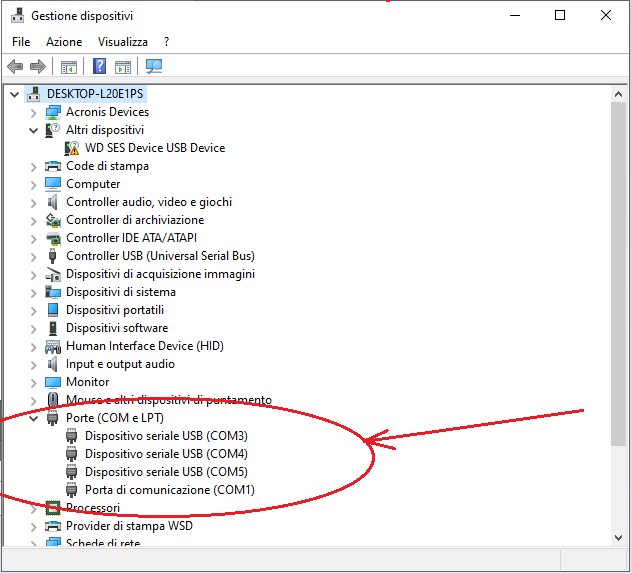 |
If the COM port section is empty, or nothing happens when you connect and disconnect the CAT interface, please verify that your interface is working and that you have installed the required USB drivers. (Check with the CAT interface vendor for driver installation instructions.)
|
Please note that an interface may require specific drivers for Windows 11. If your CAT interface worked in Windows 10 but stopped working in Windows 11, you likely need new drivers. Contact the vendor of the interface to resolve any driver issues.
|
|
|
|
|
If you need to print your log and place it in a binder, you can take advantage of the Printer Log module.
The module is straightforward; just open it from EasyLog's Modules menu and select the log you want to print.
|
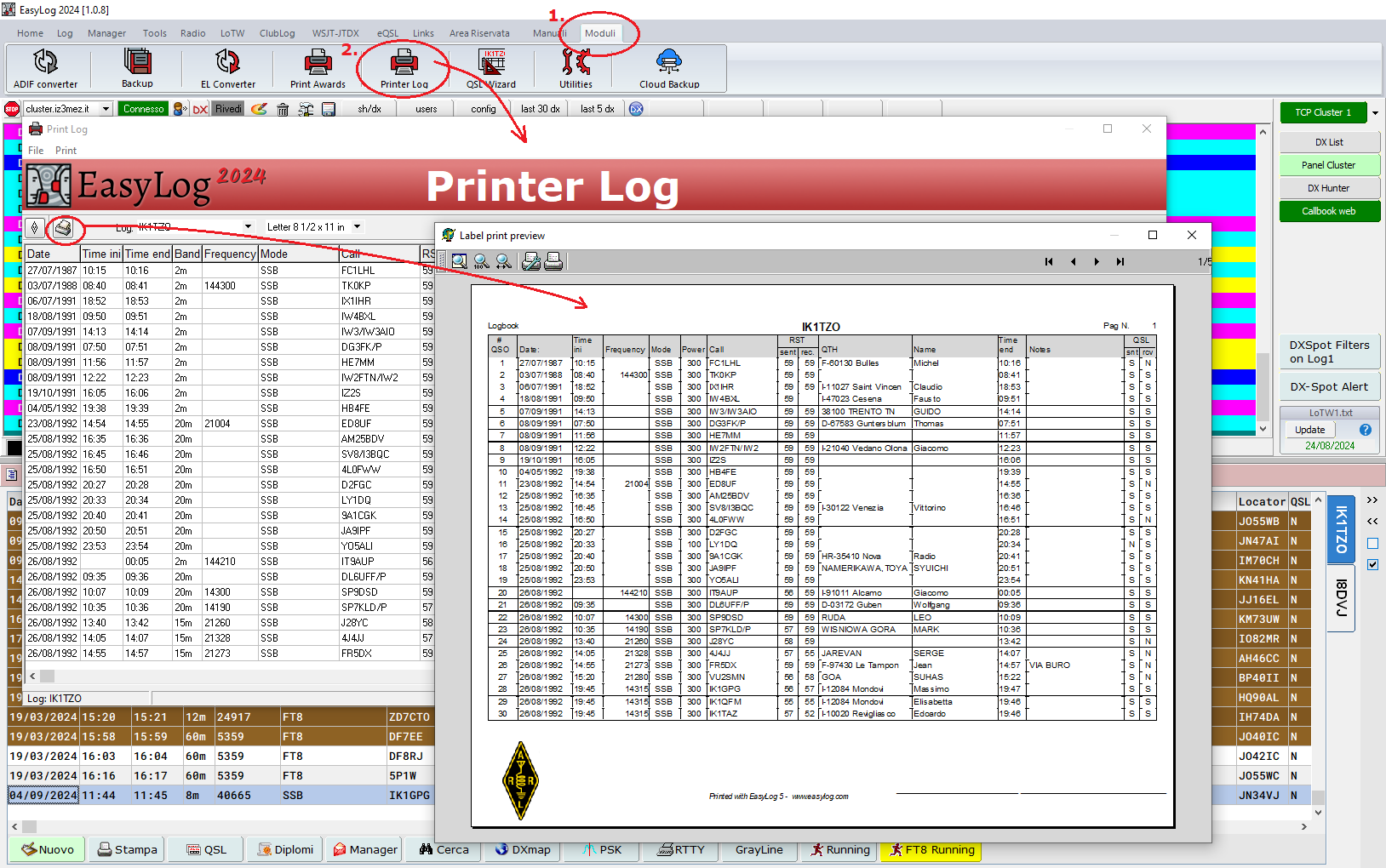 |
You can add your association's logo and print all the Log or just a page range.
|
 |
|
|
How to Extract a Portion of Your Log
|
If you need to extract a portion of your Log, you can do so easily and flexibly using the Print section, as shown in the figure.
|
 |
Use the Copy button to set your selection criteria, and all QSOs matching the criteria will be copied to the buffer. You can empty the buffer first, or you can leave previous selections in the buffer, depending on your needs and goals.
|
Your selection can be made of several conditions. Please note that if you add more condition rows, they will all need to be satisfied simultaneously.
|
Once your data has been copied into the buffer, you can print a report from it (Print button), or export it to an ADIF file (>ADIF button). You can also select which fields to include using the Fields button.
|
|
|
|
✅ EasyLog Cloud Backup can store up to 2000 backups of a 10,000 QSO log or 400 backups of a 50,000 QSO log
|
✅ The safest place for your logs. We safeguard your data which often represents years of dedicated effort.
|
✅ Get 7-day free trial without any obligations
|
✅ Secure your data swiftly and restore or synchronize it with your other computers.
|
|
|
 |
🔍 For any questions, please reach out to us for assistance.
|
|
|
|
|
|
|
|
|
|
✅ 12 months of free access to our Users Reserved Area
|
✅ All the new releases with the new features and bug fixes to download for free.
|
✅ EasyLog's license is perpetual; it does not expire. Yearly renewal is optional
|
|
|
|
|
|
The success of a team doesn't lie in aligning everyone's perpective, but in the process of reaching a shared understanding.
-Line Rainville
EasyLog Team
|
|
|
|
|
We would like to extend our heartfelt thanks to each and every one of you who have taken the time to send us your photos, texts, comments, and positive feedback.
Your contributions bring a rich diversity and a deeper sense of connection to our community, and we are delighted to announce that we will be publishing them in our upcoming editions.
It is truly inspiring to see the enthusiasm and engagement from so many of you, and we are proud to share your experiences with our wider audience. Together, we are building something meaningful, and we are grateful for your continued participation.
Thank you for being an integral part of our shared journey!
|
|
|
|
|
|
|
|
|
We receive a welcome comment from Alessio, IK5UII
"Hello, I recently bought the license, I take this opportunity to congratulate you on the program, I already had an old version of easylog in the 90s
But this one is beautiful. thanks 73 de Alessio, IK5UII"
|
|
|
We received some useful and interesting suggestions from Martino, IK3RIY, one of which concerns the CW keyer.
"I receive and read your super bulletin with pleasure. In addition to the compliments for EasyLog and the related bulletins (from which I finally learned how to use OminiRig correctly) I take this opportunity to send you two implementation suggestions..."
Martino suggests adding a LOOP function to send the CQ call every few seconds. Since the CW keyer is an area on which we are carrying out evaluations and analysis to add new features, we wanted to take the opportunity to do some sort of survey. If you are passionate and expert in CW and want to contribute to the analysis of a renovation of this area, contact us with your ideas and proposals to be analyzed together with our development group.
|
|
|
|
|
 |
Read past newsletters on our site.
Click here!
|
|
|
|
|
|
|
|
|
|
|
|
 |
"Where is Jim? He is missing the party!"
"All is fine for Jim, you know...
a DX is a DX."
|
|
|
 |
"I really need to recharge my batteries and have long walks in the nature, canoing and fishing..."
|
 |
|
|
|
|
|
|
|
|
|
Stay connected, follow us and give us a like.
|
|
|
Center Images
|
|
|
|
|
You are receiving this newsletter because you are either a registered user or have downloaded the trial version or the E-book.
|
|
Microware Software © 1989-2024 - All rights reserved
|
|
|
|
|
|
|